Set Up Your Organization
Create and configure your organization to start using Transcribe Health with your team.
Organizations are how teams are structured in Transcribe Health. Every transcription session, document template, and billing plan is tied to an organization.
Steps
1. Navigate to your dashboard
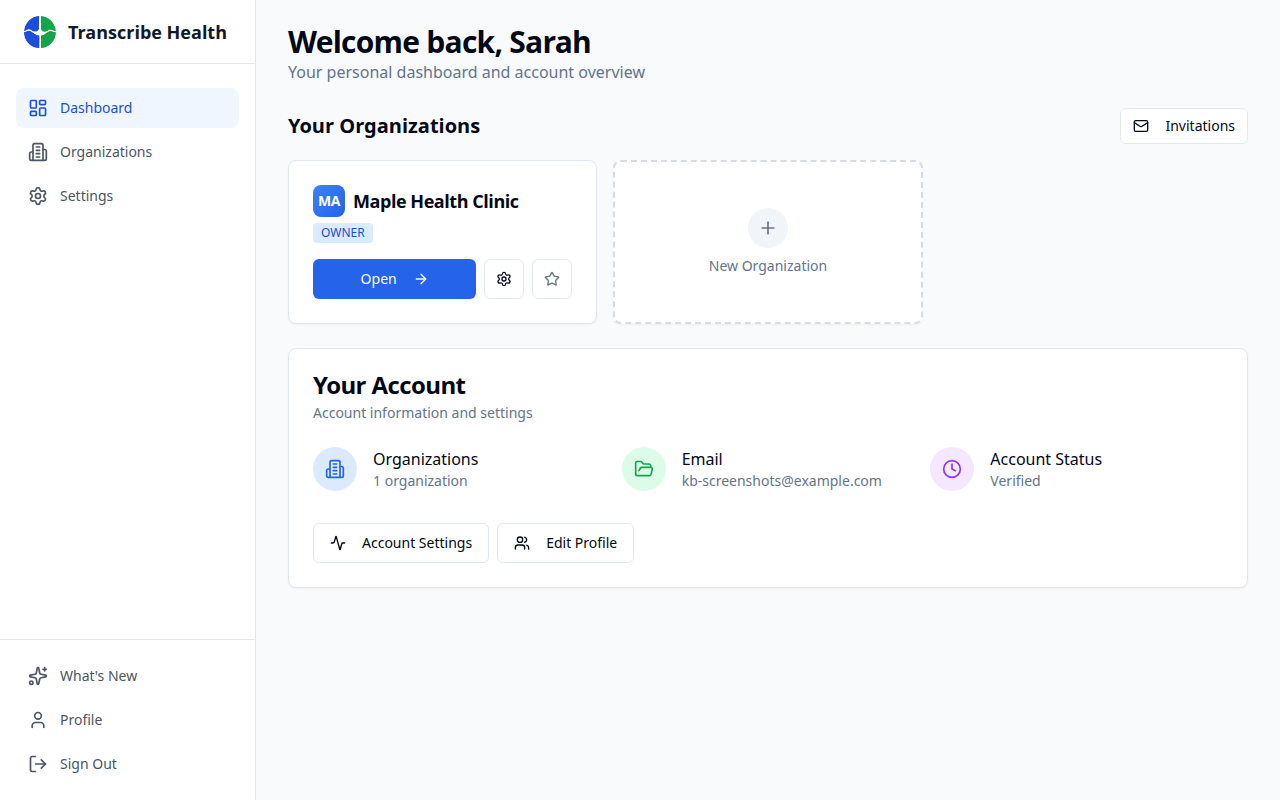
After signing in, you'll land on your personal dashboard. You'll see your existing organizations and a card to create a new one.
2. Create a new organization
Click the New Organization card (with the + icon) to start the creation process. Enter your organization name - typically your clinic or practice name.
3. Choose your plan
Select a subscription plan that fits your team's needs. All plans include a free trial period so you can evaluate the platform before committing.
4. Invite team members
Once your organization is created, navigate to Settings > Members to invite colleagues by email. You can assign roles:
| Role | Permissions |
|---|---|
| Owner | Full access, billing, member management |
| Admin | Member management, settings, all clinical features |
| Member | Transcription sessions, documents, templates |
5. Configure organization settings
Under Settings, you can configure:
- Data retention policies - Set how long transcription data is stored
- SSO/SAML - Connect your identity provider for single sign-on
- Security settings - Enforce MFA requirements for all members
What's next?
With your organization set up, your team can start creating transcription sessions and using document templates.
Related Articles
Can't find what you're looking for?
Our team is here to help. Reach out and we'll get back to you within 24 hours.
Contact Support